Myyntilaskut siirtyvät Verstaanista kirjanpitoon itsestään. Laskutat tasan kuten ennenkin, eikä samoja laskuja tarvitse enää tallentaa käsin kirjanpito-ohjelmaan tai kuljettaa siirtotiedostoina. Netvisor ja Fennoa ovat käytössä nyt, ja lisää kirjanpito-ohjelmia on tulossa.
Lasku siirtyy, kun se on lähetetty asiakkaalle
Kun lasku on lähetetty asiakkaalle, se siirtyy automaattisesti kirjanpitoon. Laskun PDF menee mukaan liitteeksi, joten kirjanpitäjä näkee alkuperäisen laskun samassa paikassa. Hyvityslaskut kohdistetaan alkuperäiseen laskuun automaattisesti.
Siirron tila näkyy laskulla. Jos siirto epäonnistuu, se nostetaan esiin laskulistalla, ja sen voi käynnistää uudelleen yhdellä painalluksella.
Myynti oikeille tileille
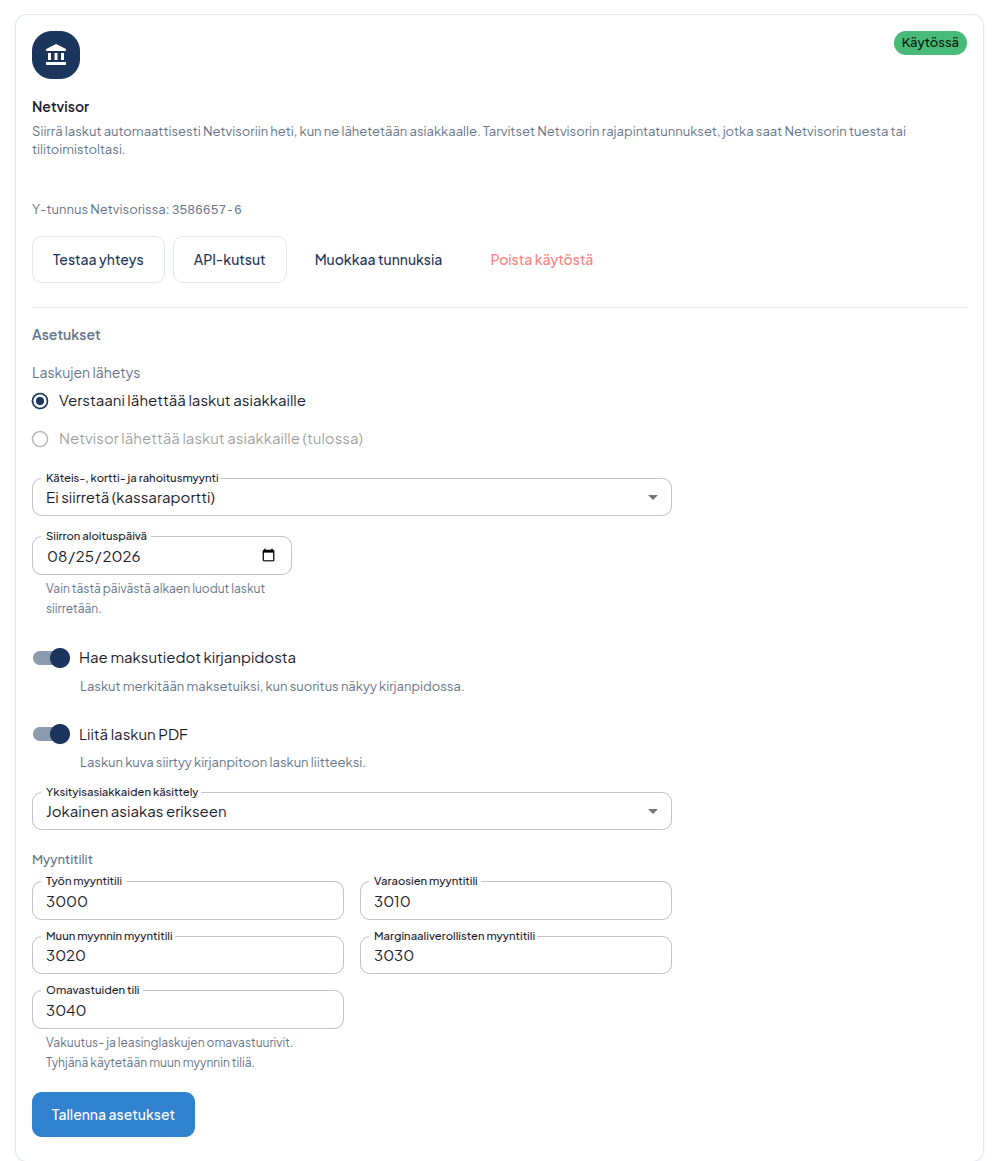
Työ, varaosat, muu myynti, marginaaliverolliset käytetyt osat sekä vakuutus- ja leasinglaskujen omavastuut ohjautuvat kukin omalle myyntitililleen korjaamosi tilikartan mukaan. Tilikartta haetaan kirjanpidosta valmiiksi valintalistaksi, joten tilinumeroita ei tarvitse näppäillä.
- Käteis-, kortti- ja rahoitusmyynti. Valitset, siirretäänkö ne maksettuina, avoimina vai ei lainkaan, jolloin ne kirjataan kassaraportilta.
- Yksityisasiakkaat voit viedä yhdelle kokoojaasiakkaalle, jolloin kirjanpidon asiakasrekisteri pysyy siistinä.
- Siirron aloituspäivä. Vain sen jälkeen luodut laskut siirtyvät, joten vanha laskuhistoria ei lähde liikkeelle.
Maksutiedot takaisin Verstaaniin
Kun suoritus näkyy kirjanpidossa, lasku merkitään Verstaanissa maksetuksi. Ei enää kuittaamista kahteen paikkaan.
Hyvä tietää
- Laskut lähtevät asiakkaille edelleen Verstaanista kuten ennenkin. Kirjanpitoon lasku menee valmiiksi avoimena myyntisaatavana, joten sama lasku ei lähde kahteen kertaan. Vaihtoehto, jossa Netvisor lähettää laskut asiakkaille, on tulossa.
- Ostolaskut ja muu kirjanpitoaineisto eivät kulje tätä kautta.
- Yksi integraatio kerrallaan. Yhdellä korjaamolla voi olla käytössä yksi kirjanpitointegraatio kerrallaan.
Käyttöönotto
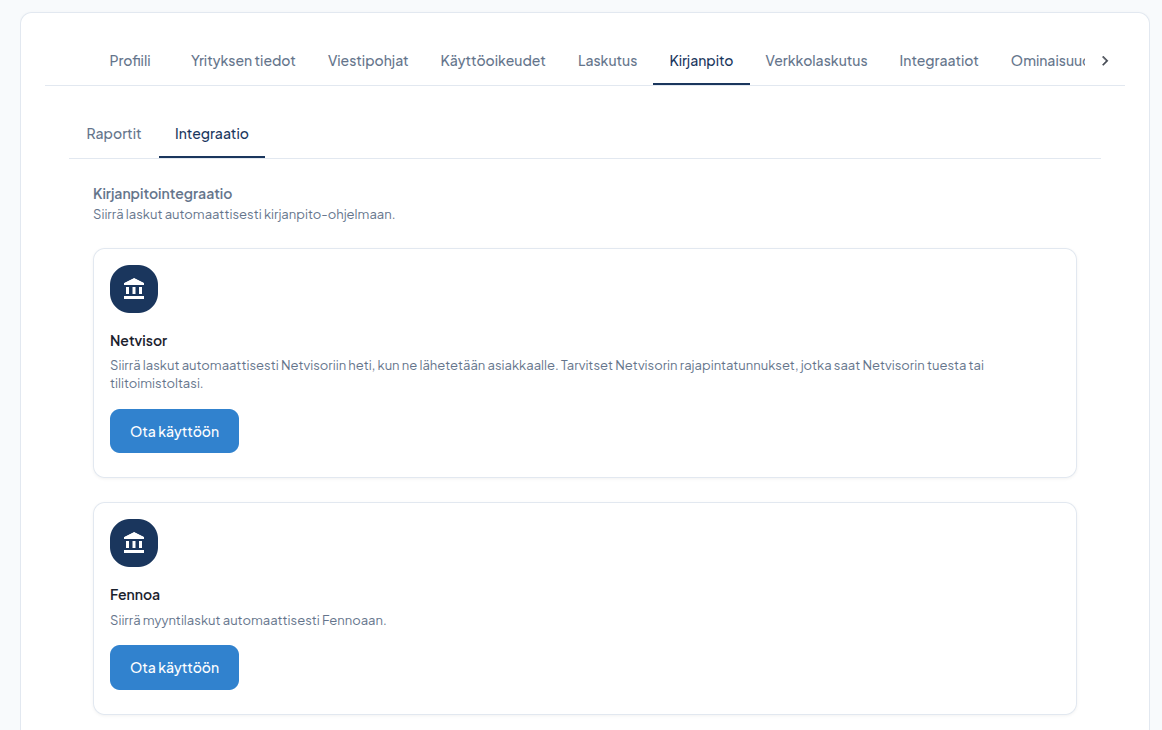
Kirjanpitointegraatio sisältyy kaikkiin Verstaani-paketteihin Aloituksesta alkaen ilman lisämaksua. Löydät sen kohdasta Asetukset → Kirjanpito → Integraatio.
Tarvitset kirjanpito-ohjelman rajapintatunnukset, jotka saat tilitoimistoltasi tai ohjelman tuesta. Netvisorissa rajapintaliikenne pitää lisäksi avata Verstaanille — ohje ja tarvittava käyttöoikeusavain näkyvät valmiina asetusnäytöllä.
- Paina Ota käyttöön ja syötä tunnukset.
- Paina Testaa yhteys.
- Valitse myyntitilit ja siirron aloituspäivä.
- Paina Tallenna asetukset. Tästä eteenpäin siirto toimii itsestään.
Autamme mielellämme alkuun:
asiakaspalvelu@verstaani.fi
WhatsApp +358 44 901 7601
Your sales invoices now flow from Verstaani into your accounting software on their own. You invoice exactly as before, and nobody has to key the same invoices into the accounting system again or shuffle export files around. Netvisor and Fennoa are available now, and more accounting systems are on the way.
The invoice is transferred once it has been sent to the customer
Once an invoice has been sent to the customer, it is transferred to accounting automatically. The invoice PDF goes along as an attachment, so your accountant sees the original invoice in the same place. Credit notes are linked to the original invoice automatically.
The transfer status is shown on the invoice. If a transfer fails, it is highlighted in the invoice list and can be retried with one click.
Sales land on the right accounts
Labor, parts, other sales, margin-scheme used parts and the deductible rows on insurance and leasing invoices each go to their own sales account according to your chart of accounts. The chart of accounts is fetched from the accounting system into a ready-made dropdown, so there are no account numbers to type.
- Cash, card and financing sales. You choose whether they are transferred as paid, as open, or not at all — in which case they are booked from the cash register report.
- Private customers can be sent to one collective customer, which keeps the customer register in accounting tidy.
- Transfer start date. Only invoices created after it are transferred, so your invoice history stays put.
Payments come back to Verstaani
When a payment shows up in accounting, the invoice is marked as paid in Verstaani. No more ticking off payments in two places.
Good to know
- Invoices still go to your customers from Verstaani as before. The invoice arrives in accounting as an open receivable, so the same invoice is never sent twice. An option where Netvisor sends the invoices to customers is coming.
- Purchase invoices and other accounting material do not travel this route.
- One integration at a time. A workshop can have one accounting integration active at a time.
Getting started
The accounting integration is included in every Verstaani plan from Aloitus upwards at no extra cost. You find it under Settings → Accounting → Integration.
You need API credentials for your accounting software, available from your accounting firm or the software's support. For Netvisor, API access must also be opened for Verstaani — the instructions and the required permission key are shown right on the settings screen.
- Press Set up and enter the credentials.
- Press Test connection.
- Pick the sales accounts and the transfer start date.
- Press Save settings. From then on the transfer runs by itself.
We're happy to help you get started:
asiakaspalvelu@verstaani.fi
WhatsApp +358 44 901 7601
Försäljningsfakturorna överförs från Verstaani till bokföringen av sig själva. Du fakturerar precis som förut, och samma fakturor behöver inte längre sparas för hand i bokföringsprogrammet eller flyttas som överföringsfiler. Netvisor och Fennoa är i bruk nu, och fler bokföringsprogram är på väg.
Fakturan överförs när den har skickats till kunden
När fakturan har skickats till kunden överförs den automatiskt till bokföringen. Fakturans PDF följer med som bilaga, så bokföraren ser originalfakturan på samma ställe. Kreditfakturor riktas automatiskt mot den ursprungliga fakturan.
Överföringens status syns på fakturan. Om överföringen misslyckas lyfts den fram i fakturalistan, och den kan startas om med ett knapptryck.
Försäljningen på rätt konton
Arbete, reservdelar, övrig försäljning, marginalbeskattade begagnade delar samt självrisker på försäkrings- och leasingfakturor styrs var och en till sitt eget försäljningskonto enligt din verkstads kontoplan. Kontoplanen hämtas färdigt från bokföringen som en urvalslista, så kontonummer behöver inte matas in.
- Kontant-, kort- och finansieringsförsäljning. Du väljer om de överförs som betalda, öppna eller inte alls, varvid de bokförs från kassarapporten.
- Privatkunder kan du föra över till en enda samlingskund, så att bokföringens kundregister hålls prydligt.
- Startdatum för överföringen. Bara fakturor som skapats efter det överförs, så den gamla fakturahistoriken sätts inte i rörelse.
Betalningsuppgifterna tillbaka till Verstaani
När betalningen syns i bokföringen märks fakturan som betald i Verstaani. Inget mer kvitterande på två ställen.
Bra att veta
- Fakturorna går fortfarande ut till kunderna från Verstaani precis som förut. Till bokföringen går fakturan färdigt som en öppen kundfordran, så samma faktura skickas inte två gånger. Ett alternativ där Netvisor skickar fakturorna till kunderna är på väg.
- Inköpsfakturor och annat bokföringsmaterial går inte via den här vägen.
- En integration i taget. En verkstad kan ha en bokföringsintegration i bruk åt gången.
Införande
Bokföringsintegrationen ingår i alla Verstaani-paket från Aloitus uppåt utan extra kostnad. Du hittar den under Inställningar → Bokföring → Integration.
Du behöver bokföringsprogrammets API-uppgifter, som du får från din bokföringsbyrå eller programmets support. I Netvisor måste API-trafiken dessutom öppnas för Verstaani — anvisningen och den nyckel som behövs visas färdigt på inställningsskärmen.
- Tryck på Ta i bruk och ange uppgifterna.
- Tryck på Testa anslutningen.
- Välj försäljningskonton och startdatum för överföringen.
- Tryck på Spara inställningarna. Från och med nu sköter överföringen sig själv.
Vi hjälper dig gärna i gång:
asiakaspalvelu@verstaani.fi
WhatsApp +358 44 901 7601