Verstaaniin on julkaistu kaksi uutta toimintoa: varaosamyynti eli osien myynti ilman työmääräystä sekä OEM-huoltopaketit, joilla valmistajan virallinen huolto-ohjelma tulee työmääräykselle valmiina.
Varaosamyynti: kassamyynti ja lähetteet
Kaikkea ei myydä työmääräyksen kautta. Asiakas tulee tiskille ostamaan pyyhkijänsulat, naapurikorjaamo hakee jarrupalat, taksiyrittäjä käy osilla pitkin kuukautta. Näihin on nyt oma osionsa: Varaosamyynti, jonka alla ovat kassamyynti ja lähetteet.
Kassamyynti
Kassamyynti on tehty tiskin tahtiin: skannaa, maksa, luovuta. Hakukenttä on valmiiksi aktiivinen, joten viivakoodinlukijalla — tai puhelimen kameralla — osan saa koriin suoraan. Osan voi hakea myös nimellä tai koodilla, ja haku kattaa myös tuoteluettelot. Eniten myydyt nimikkeet kannattaa laittaa pikavalintoihin, jolloin ne lisätään yhdellä napautuksella.
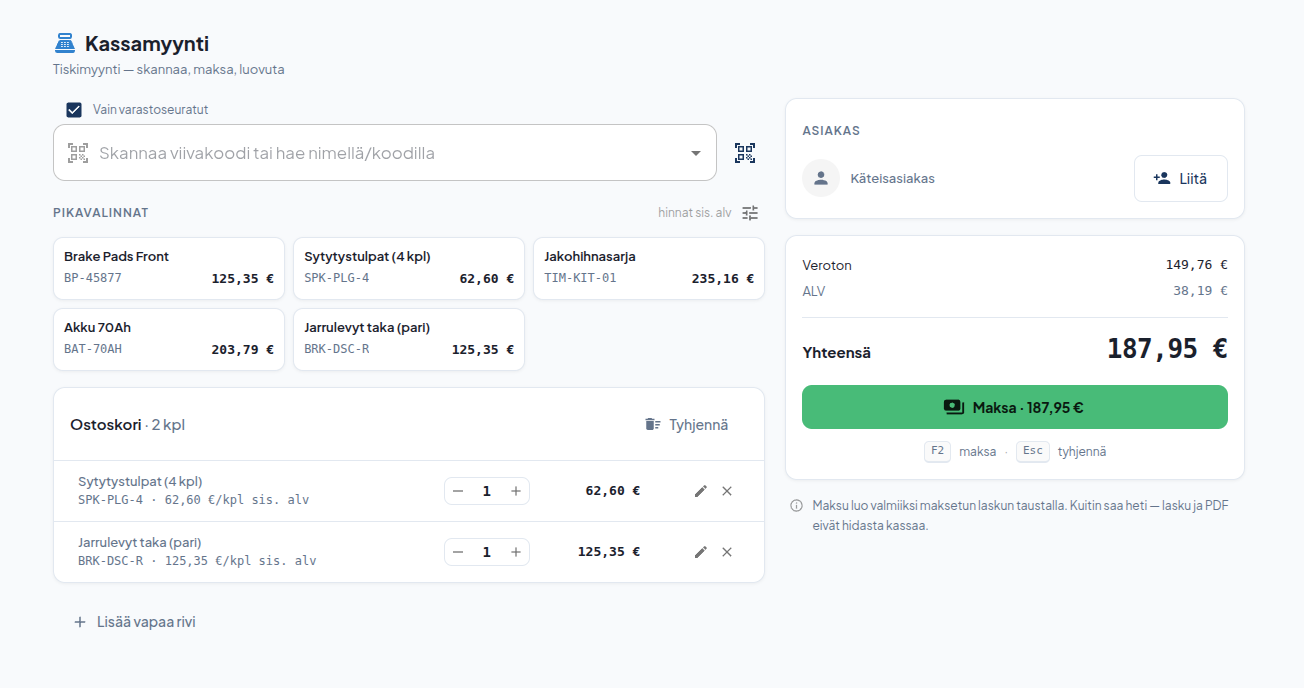
Asiakastietoja ei tarvita — ilman asiakasta myynti kirjautuu käteisasiakkaana. Asiakkaan voi silti liittää, jos haluat myynnin näkyvän hänen ostohistoriassaan. Maksutavaksi käy käteinen, kortti tai maksupääte, ja jos käteinen ei riitä, loput voi maksaa kortilla. Maksu luo taustalla valmiiksi maksetun laskun: kuitin saa heti, eikä lasku tai PDF hidasta kassaa.
Lähetteet ja koontilaskutus
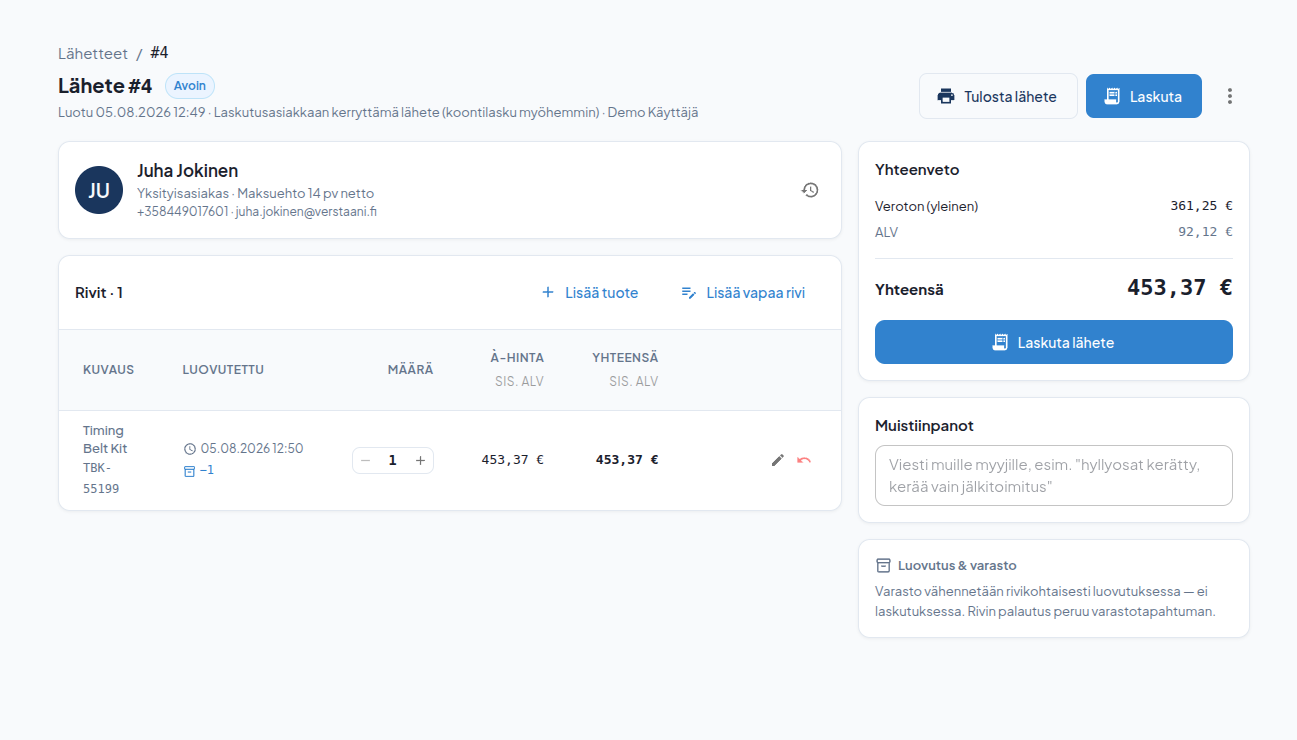
Lähete on laskutusasiakkaan avoin "piikki". Osat kertyvät lähetteelle päivien tai viikkojen ajan, ja kuun vaihteessa valitset haluamasi lähetteet ja teet niistä yhden koontilaskun. Koontilasku syntyy laskuluonnoksena, jonka tarkistat ja lähetät normaalisti Laskut-sivulta.
Muutamia asioita, jotka ratkaisimme samalla:
- Varasto pysyy oikeana. Hyllyosa vähenee heti kun se lisätään koriin tai lähetteelle — ei vasta laskutuksessa. Rivin palautus peruu varastotapahtuman automaattisesti.
- Tilattavat osat. Jos osaa ei ole hyllyssä, lisää rivi tilattavana. Rivi kulkee tiloissa tilataan → tilattu → saapunut → luovutettu, ja varasto vähenee vasta luovutuksessa. Tilausviite ja arvioitu saapumispäivä kirjataan riville, joten "joko se osa tuli" -puheluun löytyy vastaus.
- Saapumisilmoitus tekstiviestillä. Halutessasi asiakas saa automaattisesti viestin heti kun merkitset osan saapuneeksi.
- Marginaalivero. Käytetylle osalle voi kytkeä marginaaliverotuksen ja kirjata ostohinnan, jolloin ALV lasketaan vain katteesta.
- Raportit ja kirjanpito. Jokainen kassamyynti ja koontilasku luo oikean laskun, joten ne näkyvät kassaraportissa, liikevaihtoraportissa ja kirjanpitoviennissä samalla tavalla kuin työmääräyksen laskut.
OEM-huoltopaketit
Toinen uutuus poistaa määräaikaishuollon selvittelytyön. Kun luot työmääräyksen ja haet ajoneuvon rekisterinumerolla, näet ilmoituksen OEM-huoltopaketit saatavilla, jos ajoneuvolle on valmistajan huolto-ohjelma. Syötä matkamittarilukema ja hae paketit.
Verstaani ehdottaa kilometrejä vastaavaa huoltoväliä ja näyttää myös edellisen ja seuraavan välin — voit valita minkä tahansa. Määrävälein toistuvat lisäpalvelut, kuten raitisilmasuodatin tai jarruneste, näytetään erikseen ja voit rastia mukaan ne, jotka tälle kerralle kuuluvat.
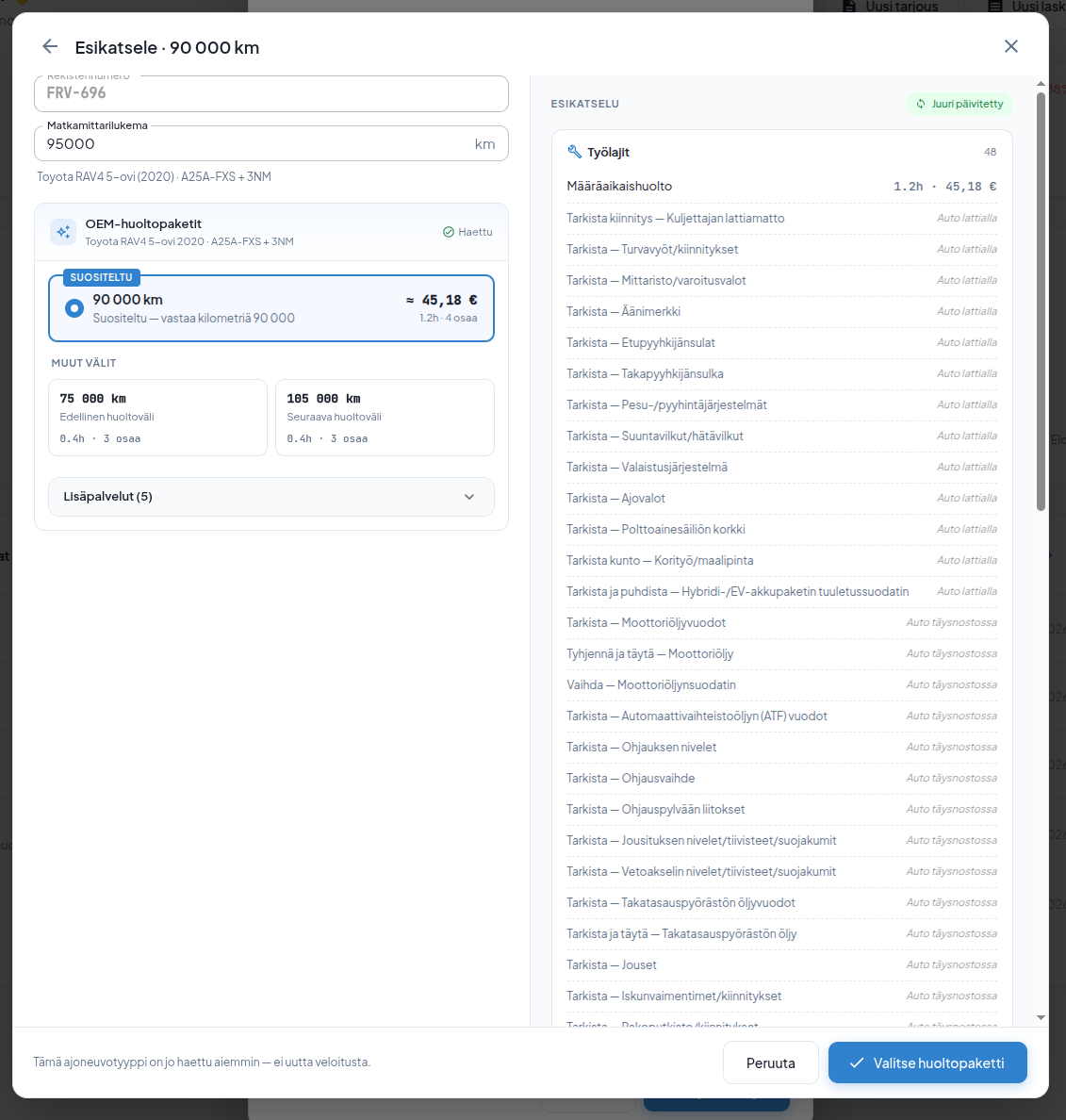
Esikatselusta näet koko paketin ennen kuin valitset sen: työlajit, tarkastuskohteet työvaiheittain ja osat hintoineen. Osat yhdistetään automaattisesti ensin omaan varaosaluetteloosi, sitten tuoteluetteloihin ja lopuksi toimittajien saldoihin — ja jos jokin osa ei tunnistu, voit vaihtaa sen tai täydentää hinnan itse.
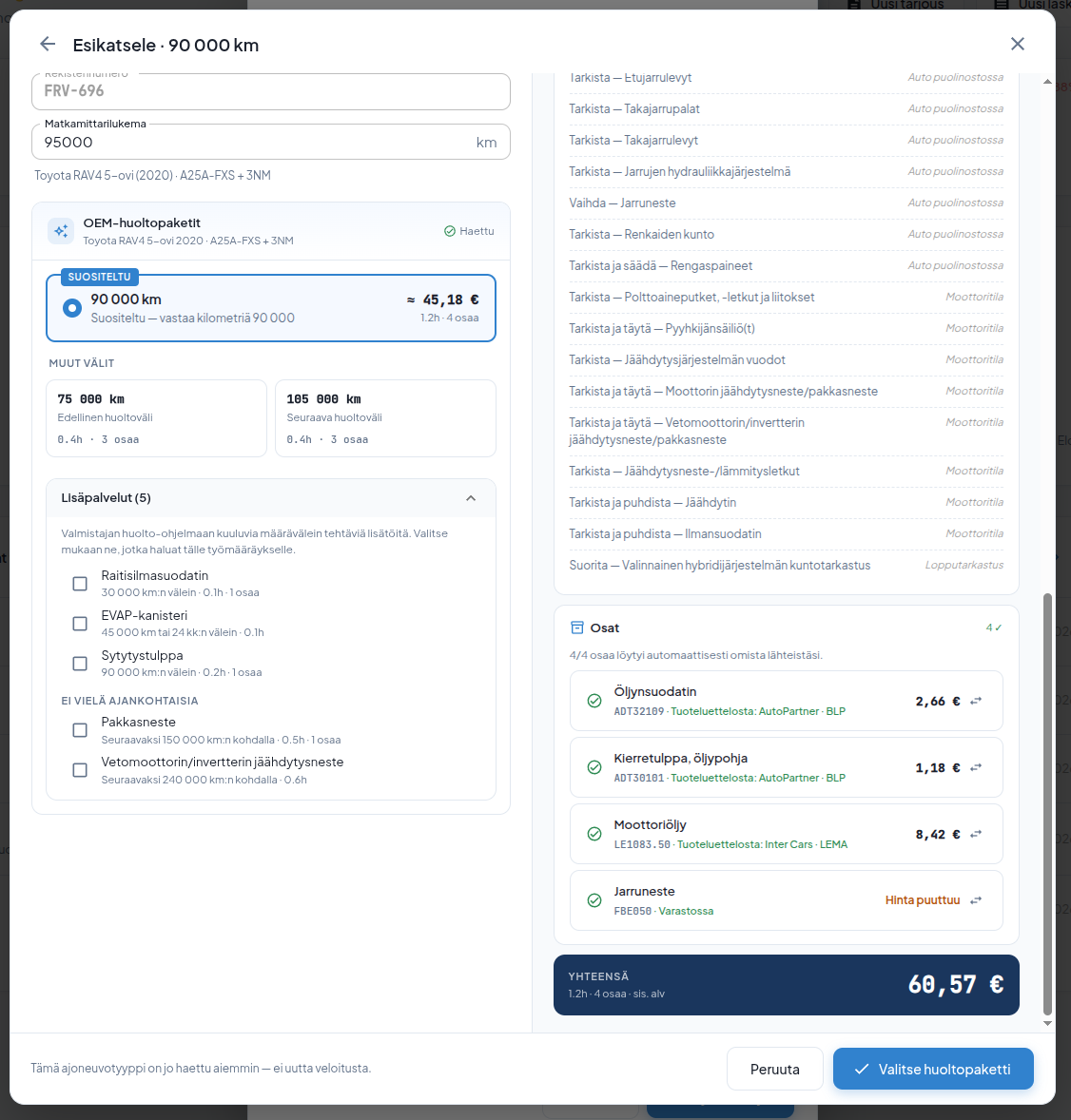
Kun painat Valitse huoltopaketti, työlajit, osat ja tarkastuslista liitetään työmääräykselle. Työmääräykselle syntyy myös mekaanikon sisäinen tarkastuslista ja asiakkaalle näkyvä yhteenveto tehdyistä töistä. Paketin voi liittää myös olemassa olevalle työmääräykselle, jos sille ei ole vielä lisätty töitä tai osia.
Osien ja tarkastuskohteiden nimet käännetään suomeksi automaattisesti. Kannattaa silti tarkistaa osien määrät ennen laskutusta: huolto-ohjelma ei kerro esimerkiksi moottoriöljyn litramäärää, joten jokainen osa lisätään yhden kappaleen oletusmäärällä.
Hinnoittelu
OEM-huolto-ohjelmat on erikseen käyttöön otettava, käyttöperusteisesti laskutettava toiminto. Veloitus on 0,80 € / ajoneuvotyyppi (alv 0 %) ja tapahtuu vain kerran kutakin ajoneuvotyyppiä kohden, kun paketti liitetään työmääräykselle. Saman ajoneuvotyypin myöhemmät haut ja liittämiset ovat maksuttomia — myös eri autoyksilöille. Esikatselu ei veloita mitään; uusia ajoneuvotyyppejä voi esikatsella enintään viisi päivässä ilman huoltopaketin liittämistä.
Käyttöönotto
Molemmat toiminnot otetaan käyttöön asetuksista. Varaosamyynti sisältyy Pro-tasoon ja avataan tilillesi pyynnöstä, minkä jälkeen kytket sen päälle kohdasta Asetukset → Ominaisuudet → Varaosamyynti käytössä. Varaosamyynti on käytettävissä admin- ja työnjohtajarooleilla. OEM-huolto-ohjelmat kytkee pääkäyttäjä kohdasta Asetukset → Ominaisuudet → Yleiset.
Autamme mielellämme alkuun:
asiakaspalvelu@verstaani.fi
WhatsApp +358 44 901 7601
Two new capabilities have shipped in Verstaani: parts sales — selling parts without a work order — and OEM service packages, which bring the manufacturer's official maintenance programme onto the work order ready-made.
Parts sales: counter sales and delivery notes
Not everything is sold through a work order. A customer walks in for wiper blades, the workshop next door picks up brake pads, a taxi entrepreneur collects parts throughout the month. All of this now has its own section: Parts Sales, containing counter sales and delivery notes.
Counter sales
Counter sales are built for counter speed: scan, pay, hand over. The search field is focused by default, so a barcode reader — or your phone camera — drops the part straight into the cart. You can also search by name or code, and the search covers your product catalogues too. Put your best sellers into quick picks and they are added with a single tap.
No customer details are needed — without a customer the sale is recorded as a walk-in. You can still attach a customer if you want the sale in their purchase history. Payment can be cash, card or payment terminal, and if the cash doesn't cover it, the rest goes on card. The payment creates a fully paid invoice in the background: the receipt prints immediately, and neither the invoice nor the PDF slows down the queue.
Delivery notes and consolidated invoicing
A delivery note is an account customer's open tab. Parts accumulate on it for days or weeks, and at the end of the month you select the notes you want and turn them into a single consolidated invoice. The consolidated invoice is created as a draft that you review and send as usual from the Invoices page.
A few things we solved along the way:
- Stock stays correct. A shelf part is deducted the moment it is added to the cart or the note — not at invoicing. Returning a line reverses the stock transaction automatically.
- Special orders. If a part isn't on the shelf, add the line as a special order. It moves through to order → ordered → arrived → handed over, and stock is only deducted at handover. The order reference and expected arrival date live on the line, so the "has my part arrived yet" call has an answer.
- Arrival notification by SMS. If you enable it, the customer is texted automatically the moment you mark the part as arrived.
- Margin VAT. For a used part you can switch on margin VAT and record the purchase price, so VAT is calculated on the margin only.
- Reports and accounting. Every counter sale and consolidated invoice creates a real invoice, so they appear in the cash report, revenue report and accounting export exactly like work order invoices.
OEM service packages
The second release removes the research work from scheduled maintenance. When you create a work order and look up the vehicle by registration number, you'll see an OEM service packages available notice if the manufacturer's programme exists for that vehicle. Enter the odometer reading and fetch the packages.
Verstaani suggests the interval matching the mileage and also shows the previous and next one — you can pick any of them. Additional services that recur at longer intervals, such as a cabin filter or brake fluid, are listed separately so you can tick the ones that belong to this visit.
The preview shows the whole package before you choose it: labour items, inspection points grouped by work stage, and parts with prices. Parts are matched automatically against your own parts register first, then your product catalogues, and finally supplier stock — and if a part isn't recognised, you can swap it or fill in the price yourself.
When you press Select service package, the labour items, parts and inspection checklist are attached to the work order. The work order also gets an internal checklist for the mechanic and a customer-facing summary of the work done. You can attach a package to an existing work order too, as long as no work or parts have been added to it yet.
Part and inspection names are translated into Finnish automatically. Do check the quantities before invoicing, though: the service programme doesn't state how many litres of engine oil are needed, so every part is added with a default quantity of one.
Pricing
OEM service schedules are an opt-in, usage-based feature. The charge is €0.80 per vehicle type (VAT 0%) and applies only once per vehicle type, when a package is first attached to a work order. Later lookups and attachments for the same vehicle type are free — including for different individual cars. Previews cost nothing; you can preview up to five new vehicle types per day without attaching a package.
Getting started
Both features are enabled in settings. Parts sales is included in the Pro plan and unlocked for your account on request, after which you switch it on under Settings → Features → Enable Parts Sales. It is available to the admin and foreman roles. OEM service schedules are enabled by an administrator under Settings → Features → General.
We're happy to help you get started:
asiakaspalvelu@verstaani.fi
WhatsApp +358 44 901 7601
Två nya funktioner har lanserats i Verstaani: delförsäljning, det vill säga försäljning av delar utan arbetsorder, samt OEM-servicepaket, som ger tillverkarens officiella serviceprogram färdigt på arbetsordern.
Delförsäljning: kassaförsäljning och följesedlar
Allt säljs inte via en arbetsorder. En kund kommer till disken för att köpa torkarblad, grannverkstaden hämtar bromsbelägg, taxiföretagaren hämtar delar under hela månaden. För detta finns nu en egen del: Delförsäljning, som rymmer kassaförsäljning och följesedlar.
Kassaförsäljning
Kassaförsäljningen är byggd för diskens tempo: skanna, betala, lämna över. Sökfältet är aktivt från början, så med en streckkodsläsare — eller mobilkameran — hamnar delen direkt i korgen. Delen kan också sökas med namn eller kod, och sökningen täcker även produktkatalogerna. De mest sålda artiklarna lönar det sig att lägga bland snabbvalen, så läggs de till med ett tryck.
Kunduppgifter behövs inte — utan kund bokförs försäljningen som kontantkund. Kunden kan ändå kopplas på, om du vill att försäljningen ska synas i hens köphistorik. Som betalsätt går kontant, kort eller betalterminal, och om kontanterna inte räcker kan resten betalas med kort. Betalningen skapar i bakgrunden en färdigbetald faktura: kvittot fås direkt, och varken faktura eller PDF bromsar kassan.
Följesedlar och samlingsfakturering
En följesedel är fakturakundens öppna "nota". Delarna samlas på följesedeln under dagar eller veckor, och vid månadsskiftet väljer du de följesedlar du vill och gör en enda samlingsfaktura av dem. Samlingsfakturan skapas som ett fakturautkast som du granskar och skickar på vanligt sätt från sidan Fakturor.
Några saker som vi löste på samma gång:
- Lagret hålls korrekt. En hyllvara minskar genast när den läggs i korgen eller på följesedeln — inte först vid faktureringen. Om en rad returneras återkallas lagerhändelsen automatiskt.
- Beställningsvaror. Om delen inte finns på hyllan lägger du till raden som beställningsvara. Raden går genom statusarna ska beställas → beställd → anlänt → utlämnad, och lagret minskar först vid utlämningen. Beställningsreferens och uppskattat ankomstdatum antecknas på raden, så det finns ett svar på samtalet "har delen kommit än".
- Ankomstavisering via SMS. Om du vill får kunden automatiskt ett meddelande så snart du märker delen som anländ.
- Marginalbeskattning. För en begagnad del kan marginalbeskattning aktiveras och inköpspriset registreras, varvid moms beräknas endast på marginalen.
- Rapporter och bokföring. Varje kassaförsäljning och samlingsfaktura skapar en riktig faktura, så de syns i kassarapporten, omsättningsrapporten och bokföringsöverföringen på samma sätt som arbetsorderfakturor.
OEM-servicepaket
Den andra nyheten tar bort utredningsarbetet kring periodisk service. När du skapar en arbetsorder och söker fordonet med registreringsnumret ser du meddelandet OEM-servicepaket tillgängliga, om det finns ett serviceprogram från tillverkaren för fordonet. Ange mätarställningen och hämta paketen.
Verstaani föreslår det serviceintervall som motsvarar körsträckan och visar även föregående och nästa intervall — du kan välja vilket som helst. Tilläggstjänster som återkommer med bestämda intervall, såsom kupéfilter eller bromsvätska, visas separat och du kan kryssa för dem som hör till den här gången.
I förhandsgranskningen ser du hela paketet innan du väljer det: arbetsmoment, kontrollpunkter per arbetsskede och delar med priser. Delarna matchas automatiskt först mot din egen reservdelskatalog, sedan mot produktkatalogerna och till sist mot leverantörernas saldon — och om någon del inte känns igen kan du byta ut den eller fylla i priset själv.
När du trycker på Välj servicepaket kopplas arbetsmoment, delar och checklista till arbetsordern. På arbetsordern skapas också en intern checklista för mekanikern och ett sammandrag av utfört arbete som visas för kunden. Paketet kan också kopplas till en befintlig arbetsorder, om inga arbeten eller delar ännu lagts till på den.
Namnen på delar och kontrollpunkter översätts till finska automatiskt. Det lönar sig ändå att kontrollera antalen innan faktureringen: serviceprogrammet anger till exempel inte antalet liter motorolja, så varje del läggs till med standardantalet ett stycke.
Priser
OEM-serviceprogrammen är en funktion som tas i bruk separat och faktureras enligt användning. Avgiften är 0,80 € / fordonstyp (moms 0 %) och tas ut endast en gång per fordonstyp, när paketet kopplas till en arbetsorder. Senare sökningar och kopplingar för samma fordonstyp är avgiftsfria — även för andra enskilda bilar. Förhandsgranskningen kostar ingenting; nya fordonstyper kan förhandsgranskas högst fem per dag utan att ett servicepaket kopplas på.
Införande
Båda funktionerna tas i bruk i inställningarna. Delförsäljningen ingår i nivån Pro och öppnas för ditt konto på begäran, varefter du slår på den under Inställningar → Funktioner → Delförsäljning i bruk. Delförsäljningen kan användas med rollerna admin och arbetsledare. OEM-serviceprogrammen aktiveras av huvudanvändaren under Inställningar → Funktioner → Allmänt.
Vi hjälper dig gärna i gång:
asiakaspalvelu@verstaani.fi
WhatsApp +358 44 901 7601