Varaosaliikkeen lähete luetaan Verstaaniin automaattisesti: rivit, määrät ja hinnat ilman käsin näppäilyä. Verstaani ehdottaa, mille varaosatilaukselle tai työmääräykselle rivit kuuluvat — sinä vahvistat, ja osat ovat saapuneet, varastossa tai työmääräyksellä.
Korjaamollasi on nyt oma lähete-osoite
Jokaisella korjaamolla on nyt oma lähete-sähköpostiosoite. Kun varaosaliike lähettää lähetteen siihen, Verstaani lukee rivit ja ehdottaa, mille avoimelle varaosatilaukselle tai työmääräykselle ne kuuluvat. Lähetteen rekisterinumero ja tilausnumero ohjaavat ehdotuksia. Saapuneet lähetteet löydät päävalikosta kohdasta Varaosatilaukset → Saapuneet lähetteet.
Sähköpostia ei ole pakko käyttää: voit tuoda lähetteen myös itse Tuo tiedosto -painikkeella — PDF:nä, tiedostona tai vaikka valokuvana paperilähetteestä.
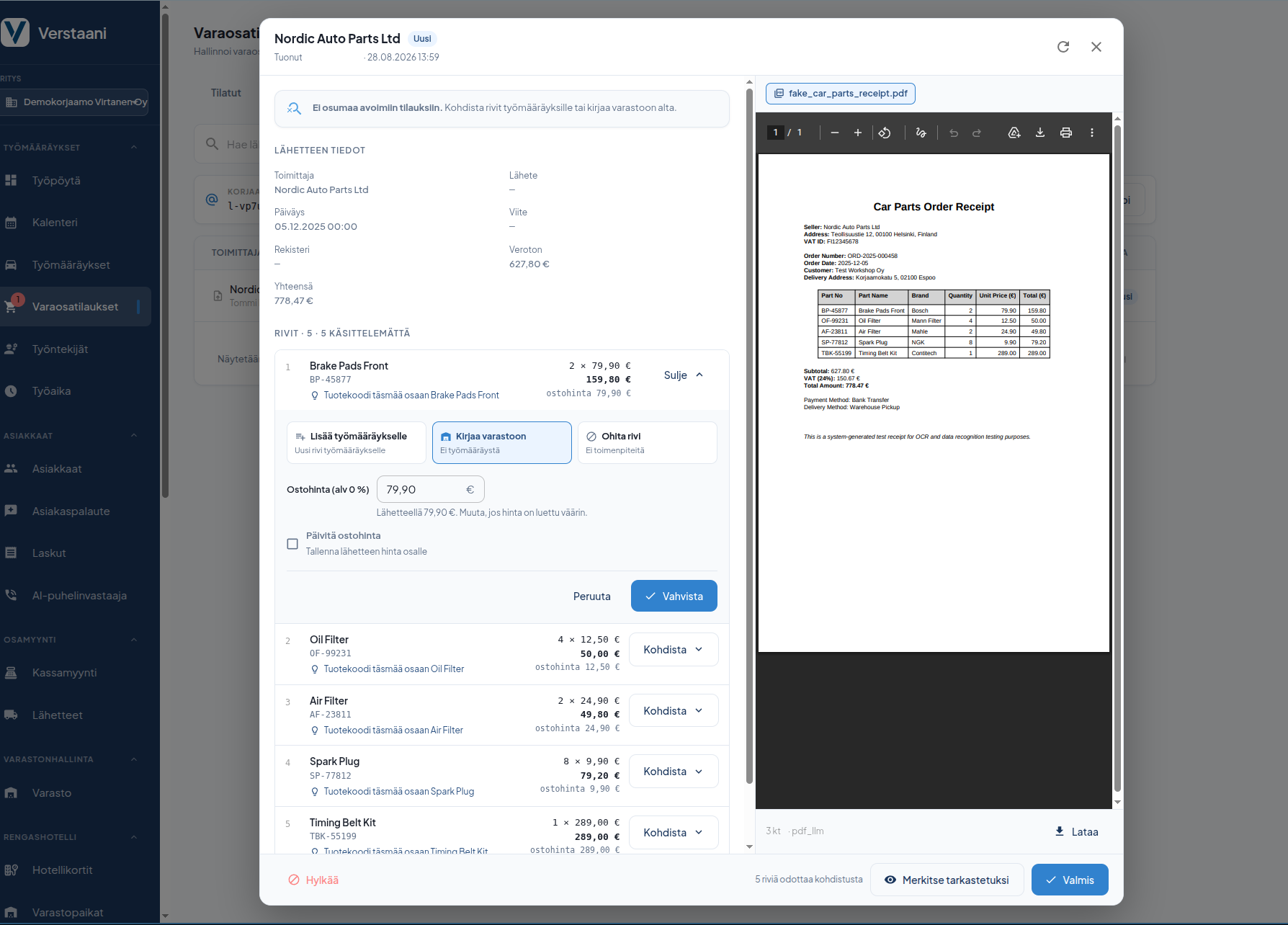
Kohdista koko lähete kerralla tai rivi kerrallaan
Jos lähete täsmää avoimeen varaosatilaukseen, vastaanotat koko lähetteen tilaukselle yhdellä painalluksella. Muuten päätät rivi kerrallaan:
- Merkitse työmääräyksen osa saapuneeksi, kun rivi vastaa työmääräykselle jo lisättyä osaa.
- Lisää uutena rivinä työmääräykselle, jos osa puuttuu vielä työmääräykseltä.
- Kirjaa varastoon, kun osa menee hyllyyn eikä suoraan mihinkään työhön.
- Ohita rivi, jos riviä ei ole tarkoitus käsitellä lainkaan.
Kun lähetteen kaikki rivit on kohdistettu, työmääräyksen osat voi merkitä saapuneiksi samasta näkymästä — erillistä kierrosta työmääräykselle ei tarvita.
Ostohinta oikein, alkuperäinen lähete tallessa
- Rivialennus ja arvonlisävero huomioidaan. Osalle kirjattava ostohinta näkyy ja on muokattavissa ennen vahvistusta, jos hinta on luettu väärin.
- Ostohinta päivittyy halutessasi. Yhdellä rastilla lähetteen hinta tallennetaan osan ostohinnaksi.
- Alkuperäinen lähete on tallessa ja näkyy rivien vieressä, joten tarkistus onnistuu samasta ikkunasta.
- Verstaani varoittaa, jos sama lähetenumero on jo vastaanotettu tai jos rivien summa ei täsmää lähetteen loppusummaan.
Käyttöönotto
Sähköiset lähetteet sisältyvät kaikkiin Verstaani-paketteihin Aloituksesta alkaen, ja toiminto on käytössä kaikilla korjaamoilla ilman erillistä käyttöönottoa. Kopioi korjaamosi lähete-osoite kohdasta Varaosatilaukset → Saapuneet lähetteet tai Asetukset → Ominaisuudet → Sähköiset lähetteet ja pyydä varaosaliikettäsi lähettämään lähetteet siihen.
Osoite on korjaamokohtainen ja salainen: anna se vain omille varaosaliikkeillesi.
Autamme mielellämme alkuun:
asiakaspalvelu@verstaani.fi
WhatsApp +358 44 901 7601
Your parts supplier's delivery note is read into Verstaani automatically: lines, quantities and prices, with no manual typing. Verstaani suggests which purchase order or work order the lines belong to — you confirm, and the parts are received, in stock or on the work order.
Your workshop now has its own delivery note address
Every workshop now has its own delivery note email address. When the supplier sends a delivery note to it, Verstaani reads the lines and suggests which open purchase order or work order they belong to. The registration number and order number on the delivery note drive the suggestions. Inbound delivery notes are in the main menu under Purchase Orders → Inbound delivery notes.
Email is optional: you can also import a delivery note yourself with the Import file button — as a PDF, a file or even a photo of a paper delivery note.
Allocate the whole note at once or line by line
If the delivery note matches an open purchase order, you receive the whole note against the order with one click. Otherwise you decide per line:
- Mark a work order part as received when the line matches a part already on the work order.
- Add it to the work order as a new line if the part is not on the work order yet.
- Book it to stock when the part goes on the shelf rather than straight into a job.
- Skip the line if it should not be processed at all.
Once every line has been allocated, you can mark the work order's parts as arrived from the same view — no separate trip to the work order.
The purchase price is right, and the original is kept
- Line discounts and VAT are taken into account. The purchase price that will be recorded on the part is shown and editable before you confirm, in case it was read wrong.
- The purchase price updates if you want it to. One checkbox saves the delivery note price as the part's purchase price.
- The original document is kept and shown next to the lines, so you can check everything in one window.
- Verstaani warns you if the same delivery note number has already been received or if the lines do not add up to the document total.
Getting started
Electronic delivery notes are included in every Verstaani plan from Aloitus upwards, and the feature is on for every workshop with nothing to enable. Copy your workshop's delivery note address from Purchase Orders → Inbound delivery notes or from Settings → Features → Electronic delivery notes and ask your parts supplier to send delivery notes there.
The address is unique to your workshop and secret: give it only to your own suppliers.
We're happy to help you get started:
asiakaspalvelu@verstaani.fi
WhatsApp +358 44 901 7601
Reservdelsbutikens följesedel läses in i Verstaani automatiskt: rader, antal och priser utan manuell inmatning. Verstaani föreslår vilken reservdelsbeställning eller arbetsorder raderna hör till — du bekräftar, och delarna är anlända, i lager eller på arbetsordern.
Din verkstad har nu en egen följesedelsadress
Varje verkstad har nu en egen e-postadress för följesedlar. När reservdelsbutiken skickar en följesedel dit läser Verstaani raderna och föreslår vilken öppen reservdelsbeställning eller arbetsorder de hör till. Följesedelns registreringsnummer och ordernummer styr förslagen. Inkomna följesedlar hittar du i huvudmenyn under Reservdelsbeställningar → Inkomna följesedlar.
Du måste inte använda e-post: du kan också importera följesedeln själv med knappen Importera fil — som PDF, som fil eller till och med som ett fotografi av en pappersföljesedel.
Rikta hela följesedeln på en gång eller rad för rad
Om följesedeln stämmer med en öppen reservdelsbeställning tar du emot hela följesedeln mot beställningen med ett knapptryck. Annars bestämmer du rad för rad:
- Märk arbetsorderns del som anländ, när raden motsvarar en del som redan lagts till på arbetsordern.
- Lägg till som ny rad på arbetsordern, om delen ännu saknas på arbetsordern.
- Bokför i lager, när delen går till hyllan och inte direkt till något jobb.
- Hoppa över raden, om raden inte alls är avsedd att behandlas.
När alla rader på följesedeln har riktats kan arbetsorderns delar märkas som anlända från samma vy — ingen separat runda till arbetsordern behövs.
Rätt inköpspris, den ursprungliga följesedeln sparad
- Radrabatt och mervärdesskatt beaktas. Det inköpspris som bokförs på delen visas och kan redigeras före bekräftelsen, om priset har lästs in fel.
- Inköpspriset uppdateras om du vill. Med en kryssruta sparas följesedelns pris som delens inköpspris.
- Den ursprungliga följesedeln finns sparad och visas bredvid raderna, så kontrollen går att göra i samma fönster.
- Verstaani varnar om samma följesedelsnummer redan har tagits emot eller om radernas summa inte stämmer med följesedelns slutsumma.
Införande
Elektroniska följesedlar ingår i alla Verstaani-paket från Aloitus uppåt, och funktionen är i bruk hos alla verkstäder utan separat införande. Kopiera din verkstads följesedelsadress från Reservdelsbeställningar → Inkomna följesedlar eller Inställningar → Funktioner → Elektroniska följesedlar och be din reservdelsbutik skicka följesedlarna dit.
Adressen är verkstadsspecifik och hemlig: ge den bara till dina egna reservdelsbutiker.
Vi hjälper dig gärna i gång:
asiakaspalvelu@verstaani.fi
WhatsApp +358 44 901 7601